
Help shoppers visualize products
Give customers another way to understand footwear, apparel, bags, watches and accessories beyond images and specifications.
WEARFITS VIRTUAL TRY-ON & CONTENT
Add AI and AR virtual try-on to your e-commerce content strategy and let customers explore clothing, footwear, bags, watches and accessories in a more personal way.
From SEO landing pages and product pages to campaigns, email and QR experiences, WEARFITS turns static product content into interactive commerce.
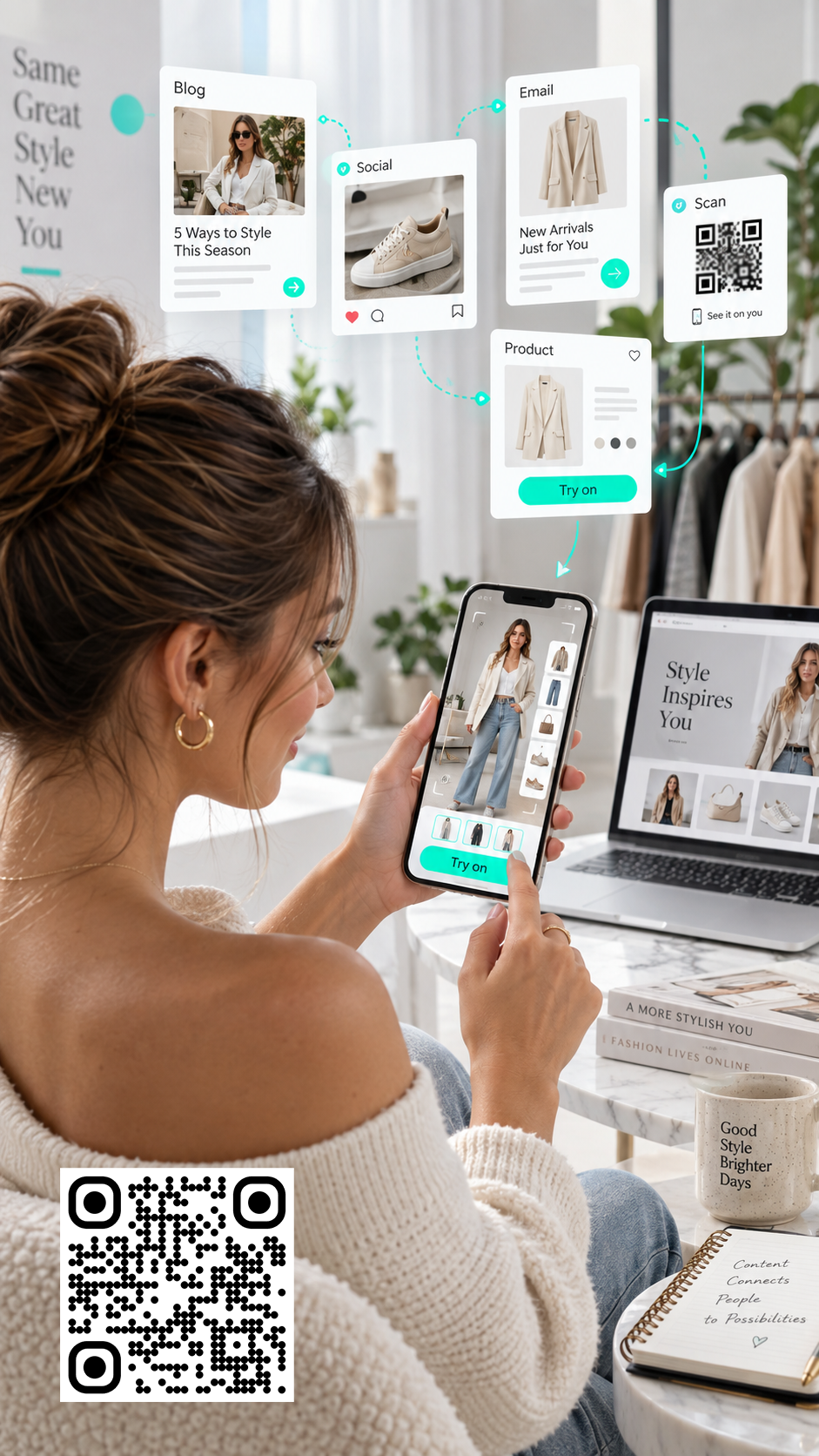
THE QUESTION STATIC CONTENT CANNOT ANSWER
Photography shows the product. Descriptions explain the details. Size charts provide measurements. Videos show products in motion.
But shoppers still have to imagine how the product will look on their body, feet or wrist — or how an accessory will appear in proportion to them.
Virtual try-on adds that personalized layer without replacing the content you already have.
MAKE EXISTING CONTENT WORK HARDER
Virtual try-on complements product content as shoppers move from interest to consideration and purchase.
Give customers another way to understand footwear, apparel, bags, watches and accessories beyond images and specifications.
Show scale, proportion, color and styling in a personal context before checkout.
Let customers compare styles, colors and products instead of relying on isolated product images.
Use try-on across product pages, launches, social campaigns, email and QR-driven experiences.
A CONNECTED CUSTOMER JOURNEY
A strong fashion content strategy supports the entire journey. Virtual try-on turns “Here is our new collection” into “Try the collection.”
Turn products into interactive campaign content across social, influencer activity, launches and QR experiences.
Add try-on entry points to relevant category and product experiences to invite deeper exploration.
Help shoppers compare colors, silhouettes, bag proportions, sneaker styles and watch designs.
Add visual information when shoppers are close to purchase but still uncertain about appearance.
Support clearer expectations about appearance, scale and styling before delivery.
ONE INTERACTIVE ASSET. MULTIPLE CHANNELS.
Use the same connected virtual experience across commerce, content and campaign touchpoints.
PRODUCT PAGES
Add virtual try-on directly to the PDP and keep the experience connected to cart and checkout.
SEO LANDING PAGES
Explain what shoppers can try, how it works and which products are supported.
SOCIAL MEDIA
Give shoppers a reason to interact with styles, colors and new collections.
EMAIL CAMPAIGNS
Use a stronger interactive CTA that opens a mobile try-on experience.
LAUNCHES & QR
Bridge print, packaging, events, retail displays and product launches with mobile experiences.
BUILT FOR FASHION CATEGORIES WHERE APPEARANCE MATTERS
Let shoppers preview shoes on their own feet using camera-based augmented reality.
Explore footwear try-onHelp shoppers explore styling, silhouettes, colors and outfit combinations through AI-generated previews.
Explore apparel try-onShow scale and proportion in relation to the body when dimensions alone are difficult to interpret.
Explore bag try-onLet customers explore how a watch looks on their wrist in an interactive browser experience.
Explore watch try-onVisual try-on helps shoppers understand appearance. Size recommendation and validated fit are separate capabilities.
VIRTUAL TRY-ON FOR SEO
Virtual try-on does not replace SEO. Search engines and shoppers still need accessible content that explains the product and the experience.
GEO & AI-POWERED DISCOVERY
AI search, conversational shopping and comparison tools depend on clear product information.
TURN PRODUCT ASSETS INTO INTERACTIVE CONTENT
Depending on the category and implementation, brands can use existing 3D assets or product digitization workflows to support virtual try-on and other commerce experiences.
HOW TO ADD VIRTUAL TRY-ON TO YOUR CONTENT STRATEGY
Start with a real shopping uncertainty, connect the experience to commerce, then test the outcome.
Define the uncertainty you want to address: appearance, proportion, styling or fit.
Connect supported products with high-quality digital assets and accurate information.
Launch it from product pages, SEO pages, campaigns, QR codes or relevant touchpoints.
Make it easy to move from try-on to product page, cart and checkout.
Track activation, exploration, add-to-cart and conversion. Use testing instead of assumptions.
FREQUENTLY ASKED QUESTIONS
Clear answers for fashion e-commerce, content and growth teams.
Virtual try-on is an interactive product visualization experience that lets shoppers preview fashion products on themselves or in a personalized digital context before buying. Depending on the category, it can use augmented reality, AI-generated imagery, computer vision, body tracking or 3D product models.
Traditional content attracts, informs and educates shoppers. Virtual try-on adds personalized visualization when customers want to understand how a product may look in relation to them.
Virtual try-on does not automatically improve rankings. Useful landing pages can explain how the experience works, which products support it and what shoppers can expect. Accessible product information, strong site structure and technical performance remain important.
Not necessarily. Visual try-on and size recommendation are separate capabilities. A shoe or clothing preview may visualize appearance without measuring physical fit or predicting comfort.
Virtual try-on can support footwear, clothing, handbags, watches and selected accessories.
Yes. It can be used in landing pages, campaigns, email, social media, QR experiences, launches and selected in-store touchpoints.
Virtual try-on can help address some appearance-related expectation gaps. It does not eliminate every reason for returns, so it works best alongside accurate photography, descriptions, product dimensions and sizing information.